How to submit a Request for Extension on eFiling
By Nicci Courtney-Clarke · Updated
Step 1:
Log into your SARS eFiling pofile.
Step 2:
Navigate to your Tax Return which was auto-assessed.
You can do this by clicking "Returns" (top menu), then "Returns History" (side menu), then "Personal Income Tax ITR12" , then select the the relevant ITR12.
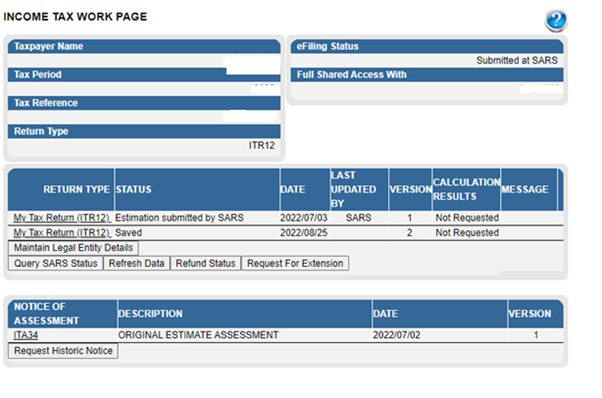
You will see the Income Tax Workpage which looks like this:
Step 3:
Click "Request For Extension"
Enter a valid reason why you were not able to submit by the deadline.
Choose which date you’d like to file, then click "Submit".
You should immediately see the follow message pop up:

Step 4:
Return to the Income Tax Workpage, and click on "Request for Extension" again to check it went through successfully.
The following error message should pop up:

Step 5:
Check for SARS letters, you can do this by going to "SARS Correspondence", then "Search Correspondence".
You should receive a confirmation letter from SARS confirming that they had received your request, this should be issued in 24 hours:

You should receive your approval reply from SARS in 10 to 14 days


Step 7:
You can then continue to file your tax return.